Selvas
BrailleSense 7
BrailleSense 7
Couldn't load pickup availability
The All New, Ultimate Smart Braille Tablets
Introduction Video: https://www.youtube.com/watch?v=ZBEeuowOC70
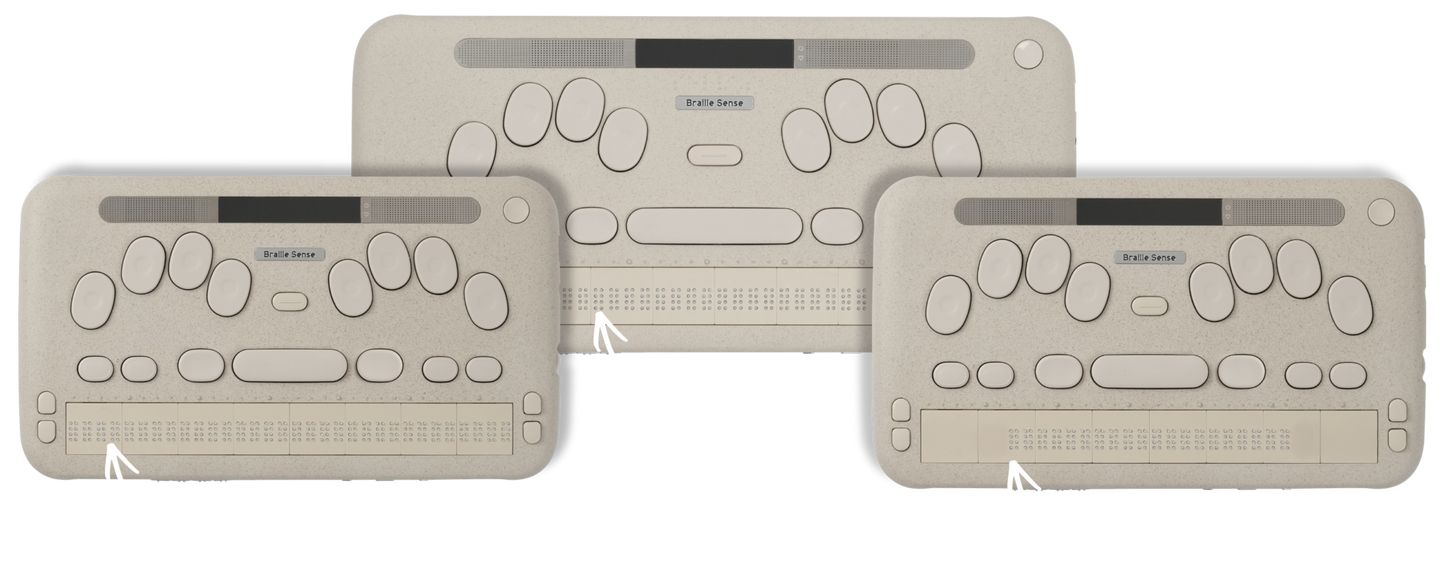
The BrailleSense 7 represents a fundamental pivot in assistive technology: Moving from an era where users must adapt to their devices to one where devices intuitively respond to users. Offered in 3 different cell formats, automatic braille refresh with smart scroll, optional detachable QWERTY keyboard, and integration with Google Gemini, this new smart tablet can meet every need.
Highlights
Active Responsive Touch (ART)
Our Active Responsive Touch (ART) technology tracks finger position in real-time with our innovative Smart Scroll functionality. As you reach the last cell of the display line, the display refreshes automatically, offering a natural, seamless, immersive reading experience akin to reading a physical book.
Smart Scroll
BrailleSense 7 introduces an Analog Scroll Wheel that allows users to quickly skim and scroll documents in a similar way a sighted person uses a mouse. Scroll a document with one hand, while following the braille with another.
Google Gemini Partnership
A long press on the Home button instantly summons Google Gemini, for instant answers to your most immediate questions or analysis of documents from any screen.
Multi-Device Connectivity
USB and Bluetooth legacy support, as well as the modern HID Braille standard, with the ability to connect multiple devices at once. BrailleSense 7 also offers Remote PC Screen Reader Control, with either Braille or a full QWERTY interface, via NVDA Remote Support.
Single-Press Dictation
With a dedicated physical dictation button driven by AI powered by Google Gemini, users can start taking notes or searching the web with a single press.
Detachable QWERTY Keyboard
In addition to the traditional Perkins Braille keyboard, and Gemini-based dictation, BrailleSense 7 Supports a Detachable QWERTY Keyboard allowing for high-speed typing in a familiar layout.
Favorites Folder
Pin your most frequently used BrailleSense and/or Android apps for easy retrieval.
Technical Specifications
What’s in the Box
Device, Battery, Carrying Case, Secondary Battery, QWERTY Keyboard, International Adapter Set
Physical Specifications
Dimensions 40-cell: 11.86 x 5.53 x 0.89 inches
Dimensions 32-cell: 9.84 x 5.53 x 0.89 inches
Weight 40-cell: <1.80 lbs
Weight 32-cell: <1.54 lbs
Platform
OS Support: Android™ 15
Google Certification: Supports Android CTS
Processor: Octa-core (Up to 3.35GHz)
Memory and Storage
Memory: 8GB LPDDR5X / 256GB USF 4.0
Card Slot: Micro SD (card detection supported)
Network Interface
Wi-Fi: Wi-Fi 802.11a/b/g/n/ac
Bluetooth: Bluetooth 5.3 Dual Mode
Connectivity Interface
GPS: Dual-band GPS(L1, L5)
USB: Dual USB-C, Dual USB-A
Display Interface
Built-in Screen: Visual LCD Supported (Syncs with the braille display for sighted teachers or colleagues)
Video Output: HDMI Supported(Syncs with the braille display for an audience)
Camera Interface
Rear Camera: 20MP High-resolution Camera with Flash
External Camera: Supports the use of plug-and-play USB cameras
Audio Interface
Loudspeaker: Dedicated Enclosure Stereo
Microphone: Stereo MEMS
3.5pi Jack: 4-Pole Audio Jack(Pin detection supported)
USB: Supports Microphone, Earphone, Line-in
Vibrator: LRA type Haptic Actuator for Immersive content with real-time music sync
Sensor
Accelerometer, Gyroscope, and Magnetometer C1(Compass)
Power Input
Battery Capacity: 4,600mAh Removable + External Power Bank Module Support
Charging: 18W USB-PD Direct Charging (Detachable Magnetic Connector)
BrailleSense 7 Questions and Answers
Q: What’s the difference between the BrailleSense 6 and BrailleSense 7?
A: BrailleSense 7 is an upgraded successor to the previous-generation BrailleSense 6, offering faster performance, touch commands, and many enhanced features. You can find more details on this page.
Q: Does the BrailleSense 7 have an user replaceable battery?
A: Yes, the BrailleSense 7 ships with both a user replaceable internal battery as well as an optional secondary battery that can be attached at the top, which not only serves to extend battery life per charge, but also is used as the mechanism by which the optional Qwerty keyboard (also included) magnetically attaches to the top of the device.
Q: What version of Android is on the BrailleSense 7 and can the OS be updated?
A: The BrailleSense 7 is currently running in Android version 15. It is our expectation that we will be able to update the operating system once within a 5-year period as we did with its predecessor, the BrailleSense 6.
Q: Why might a person want to use NVDA Remote on the BrailleSense 7?
A: NVDA Remote on the BrailleSense 7 offers quick and reliable access to a Windows-based computer over the internet as if the user is actually seated at the control computer. It is most intuitive when the Qwerty keyboard is attached to the BrailleSense 7 as you are using one Qwerty device to control another Qwerty device, although it is also possible to control the remote PC with the Perkins braille Keyboard on the BrailleSense 7; however, it isn’t nearly as natural. Please note that for this to work, your computer must be running NVDA and have remote access granted, as well as be awake and signed in.
Q: Can I create and edit spreadsheets in Excel on the BrailleSense 7?
A: Yes, the BrailleSense 7 comes with a fully functional Excel spreadsheet editor.
Q: Are the Qwerty keyboard and Secondary batteries accessories available for purchase?
A: The BrailleSense 7 optional Qwerty keyboard and secondary battery are included with every BrailleSense 7 purchase in North America. If you would like to have a regular case that does not hold the QWERTY keyboard, you may purchase that separately.
Q: How can the cursor be routed while editing a document without physical cursor routing buttons?
A: It is now possible to route the cursor to carry out an editing function by either double-tapping the braille display with gestures switched on, or by pressing one of the front panel end buttons while resting your finger to where you would like to route the cursor.
Q: Will the Web TV app work with my current television provider?
A: The Web TV may or may not work with your television provider depending on whether or not they offer a streaming option. In these cases, you will need to have an exact web address of the particular stream you would like to access.
Q: What screen sharing or viewing options are available to IT staff in educational or employment settings?
A: There are several ways to gain visual access to the BrailleSense 7, the most direct secure being via the HDMI port at the back of the device. Note that other peripherals such as a mouse can also be connected for control. Other methods of viewing the screen include remotely via one of the virtual meeting platforms or screen sharing apps.
Q: Is it difficult for me to migrate email, and other user data from my BrailleSense 6 to the BrailleSense
A: Migrating user data from one of the earlier Android based models of the BrailleSense, to the BrailleSense 7 is simply a matter of copying it from one device to the other. For example, Copying the database folder from the BrailleSense 6 to the BrailleSense 7 will automatically transfer your email and other account settings, thereby eliminating the need to go through the setup process on the BrailleSense 7.
Q: Am I able to synchronize my calendar appointments and contacts with my smart phone or previous BrailleSense Models?
A: Yes, selecting the same Google calendar and contacts on both your phone and BrailleSense 7 will result in the automatic synchronization between these devices.
Share