

Introduction to Progressive Vision Loss and Adaptive Tools
Progressive vision loss affects each person differently, and needs can shift over time. Building independence often means assembling a flexible toolkit of assistive technology for vision loss that can evolve with your daily routines at home, work, and school. The goal is to match tools to tasks—near reading, distance viewing, mobility, and tactile access—so you can stay productive through every stage.
Many people begin with video magnifiers for low vision to enhance print on mail, medication labels, recipes, and textbooks. Options range from handhelds to foldable portables and desktop CCTVs, offering adjustable zoom, high-contrast color modes, and bright, flicker-free lighting. Florida Vision Technology carries portable full HD video magnifiers that deliver crisp text and images while remaining lightweight enough to move between rooms or workplaces.
Electronic vision aids like wearable smart glasses can extend what magnifiers do by enlarging distant text, faces, whiteboards, or TV screens. Devices such as Vision Buddy Mini, eSight, Eyedaptic, and Maggie iVR provide hands-free magnification and image stabilization for reading signs or enjoying entertainment. AI-powered options including OrCam and Envision add OCR and scene description; as an authorized Ray-Ban Meta distributor, Florida Vision Technology can also help you evaluate emerging smart eyewear with live video and voice features.
When print becomes inefficient, tactile tools provide reliable, high-fidelity access to information. Braille displays and embossers enable fluent reading and accurate editing for emails, code, math, and music—areas where speech alone can slow comprehension. Multi-line braille tablets support charts and spatial layouts, while embossers produce hardcopy for labeling or study. These solutions integrate with screen readers and OCR to create a complete ecosystem of accessible reading technology.
Choosing the right combination starts with your priorities and environment. Consider:
- Primary reading tasks: long-form books, forms, or quick labels
- Contrast sensitivity, lighting, and glare at home or work
- Need for hands-free mobility and distance viewing
- Tactile literacy goals and interest in learning braille
- Compatibility with computers, tablets, and workplace systems
- Training, tech support, and future-proofing as needs change
Florida Vision Technology offers assistive technology evaluations for all ages and employers, plus individualized and group training to help you combine magnification, electronic vision aids, and braille effectively. With in-person appointments and home visits, their specialists help you identify access solutions that scale with your vision and your goals.
Understanding Video Magnifiers: Enhancing Remaining Sight
Video magnifiers are a cornerstone of assistive technology for vision loss because they amplify and enhance what you can still see. Using a camera and high-contrast display, they enlarge text, photos, and objects while optimizing color, brightness, and edge definition. For many people with macular degeneration, diabetic retinopathy, or glaucoma, these electronic vision aids can extend reading stamina, support hobbies, and make detailed tasks safer and less frustrating.
You’ll find several categories of video magnifiers for low vision, each suited to different environments and goals:
- Desktop CCTVs: Large screens and an X-Y reading tray provide steady, high-magnification viewing for long reading sessions, form filling, and crafts.
- Portable handhelds: Pocketable or 5–10” units are ideal for labels, menus, prices, and quick spot reading on the go.
- Foldable/transportable units: Larger screens that collapse for travel balance comfort with portability for students and professionals.
- Head‑mounted wearables: Hands‑free magnification for reading, distance tasks, and TV viewing; a wearable vision enhancement device can follow your gaze and adjust to varied lighting.
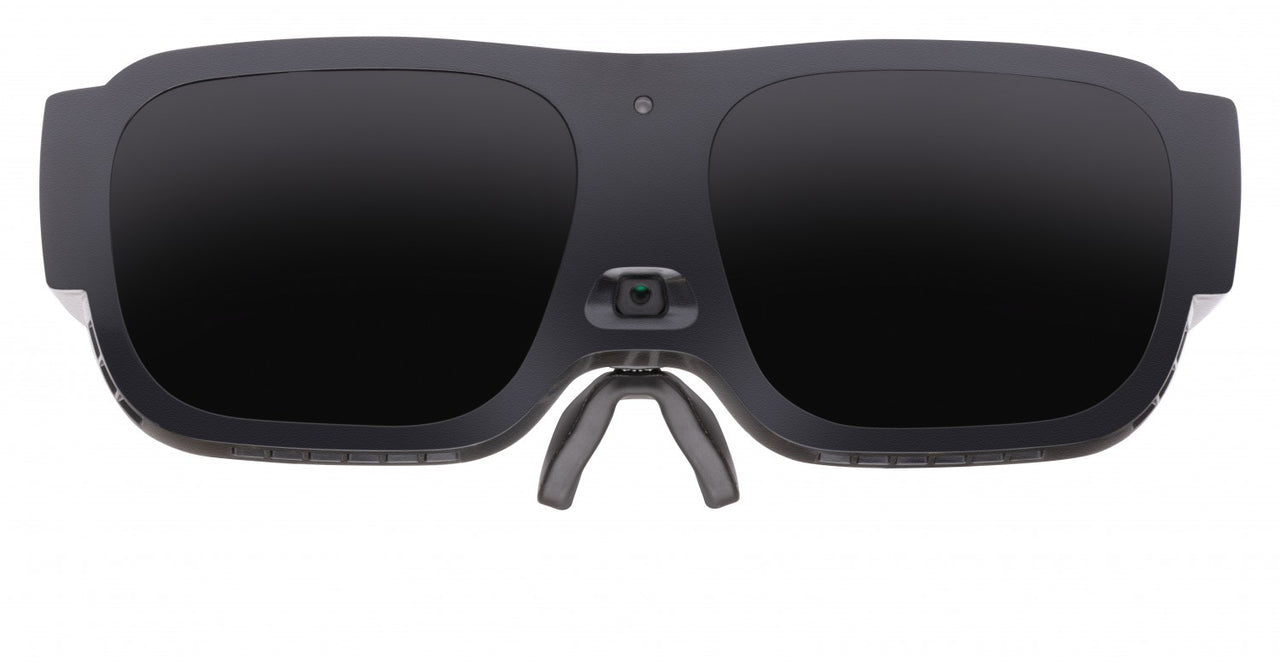

Key features to compare include magnification range and field of view, high‑contrast color modes, autofocus speed, and glare control. Many models add OCR with text‑to‑speech so you can listen to longer articles or mail when eye fatigue sets in. Look for line guides and masks to steady tracking, freeze‑frame for holding an image, and connectivity (HDMI/USB) if you want to pair with a larger monitor or computer.
In daily life, video magnifiers shine at mail and bill reading, medication management, sewing or electronics repair, and viewing appliance panels. Classroom and workplace users benefit from distance viewing attachments to see a whiteboard or presentation, while wearables help with aisle signs or restaurant boards. As accessible reading technology, they complement screen magnifiers and can bridge to audio as needs change.
Because progressive vision loss solutions are personal, hands‑on trials are essential. Florida Vision Technology offers assistive technology evaluations, individualized and group training, and in‑person appointments or home visits to fine‑tune camera positioning, contrast settings, and reading techniques. Their specialists can help you compare desktop, portable, and wearable options—and plan how video magnifiers can work alongside braille displays and embossers if your visual needs evolve over time.
The Role of Braille Solutions in Total Vision Loss
When vision decreases to the point that print is no longer usable, braille becomes the most reliable literacy tool for everyday reading, writing, and precise information access. Unlike audio alone, braille supports accurate spelling, punctuation, math notation, code syntax, and spatial layout. As part of assistive technology for vision loss, braille sits alongside speech output and navigation tools, and often replaces video magnifiers for low vision once visual effort outweighs benefit. Planning this transition early provides continuity as progressive vision loss accelerates.
Modern braille solutions include refreshable braille displays for live reading and writing, multi-line braille tablets for spatial content, and braille embossers for durable hard-copy. Displays pair with screen readers (JAWS, NVDA, VoiceOver, TalkBack) so you can draft emails on a 40‑cell display, review line-by-line code, or navigate spreadsheets with tactile accuracy. Multi-line tablets help interpret math, tables, and diagrams, while embossers produce tactile handouts, meeting agendas, labels, and reference materials—key elements of accessible reading technology.
Tactile literacy offers advantages over audio in many contexts. It reduces cognitive load during extended reading, preserves privacy when reviewing sensitive information, and improves comprehension of formatting, list structure, and data tables. For students and professionals, braille enables exact proofreading, equation layout, and command-line work without relying on memorized audio prompts.
Consider prioritizing braille displays and embossers when any of the following apply:
- Total or near-total vision loss makes print or electronic vision aids impractical for continuous reading.
- Visual fatigue or fluctuating acuity disrupts productivity despite high-quality video magnifiers for low vision.
- You need precise control over punctuation, math, programming syntax, or column alignment.
- Audio is impractical due to noise, confidentiality, or auditory processing challenges.
- STEM coursework, tactile graphics, or map reading require spatial layout.
- You need durable hard-copy for exams, meetings, or labeling systems.
A structured evaluation helps determine the right mix of progressive vision loss solutions, device size (20-, 40-, or 80‑cell), keyboard style, embossing volume, and training needs. Florida Vision Technology provides comprehensive assessments, multi-line braille tablets and embossers, and individualized or group training to build tactile fluency. Their team can help you phase from electronic vision aids and video magnifiers for low vision to a braille-first workflow, including home visits and workplace setup. With the right plan, braille becomes the stable foundation of your long-term accessibility toolkit.

Comparing Functional Benefits: Reading, Writing, and Navigation
When comparing assistive technology for vision loss, it helps to map each tool to the task. Video magnifiers for low vision can preserve functional reading and fine-detail tasks when usable vision remains, while braille displays and embossers deliver precision and stamina for text-heavy work. Electronic vision aids like AI-powered smart glasses add hands-free support for reading signs and navigating unfamiliar spaces—often bridging the gap as vision changes.
For reading, video magnifiers provide adjustable magnification, high-contrast modes, and line markers that make mail, medication bottles, appliance panels, and photos easier to see. They’re ideal for spot reading and short sessions, and large desktop CCTVs minimize eye strain compared to handhelds for extended periods. Braille, however, offers unmatched accuracy for spelling, punctuation, and complex formatting; multi-line braille tablets make tables, math, and coding structures more understandable, and embossers create durable textbooks and tactile graphics.
- Video magnifiers shine for: mail and bills, labels in the kitchen, catalogs, printed instructions, and family photos. A desktop unit with an XY table supports steady reading, while a 5–10 inch portable unit helps on the go.
- Braille excels for: sustained reading, study, technical content, and precise proofreading. Multi-line braille improves navigation of tables and code, while embossers produce hardcopy braille and tactile diagrams for classroom or exam use.
Writing needs also differ. Under a CCTV, users can sign documents, write checks, and complete forms with the benefit of a writing tray and edge guides; some models add distance viewing for whiteboards. Braille displays paired with screen readers enable efficient email, reports, and coding, with Perkins-style input offering fast, accurate text entry. For labeling, embossers and braille labelers make durable tags for files, pantry items, and medication organizers.
- Best fits: use a video magnifier when you need to see your pen on the page, align a signature, or verify handwriting; choose braille input for long documents, structured writing, or when visual fatigue becomes a barrier.
Navigation is where electronic vision aids stand out. Smart glasses such as OrCam and Envision can read signs, menus, and transit information aloud, identify products, and assist with object finding—complementing cane skills and GPS apps. Braille supports orientation through tactile maps, building directories, and labeled wayfinding, but it’s not a real-time obstacle detector; pairing braille with AI wearables and mobility training often delivers the safest, most flexible solution.
Because needs evolve with progressive vision loss, many people use a blended approach: start with video magnifiers for visual tasks, add braille for stamina and precision, and layer in AI-powered smart glasses for real-world reading and navigation. Florida Vision Technology provides comprehensive evaluations to match tasks with tools—whether that’s a desktop CCTV, Vision Buddy Mini, eSight or Eyedaptic wearable, OrCam or Envision glasses, or braille displays and embossers. Their individualized and group training, in-person appointments, and home visits help you build skills and confidence as your toolkit—and goals—change.
Integrating Both Technologies for a Comprehensive Accessibility Plan
Blending magnification, audio, and tactile output creates a resilient accessibility toolkit that adapts as needs change. By pairing accessible reading technology with tactile literacy, you can maintain speed, accuracy, and comfort across tasks and environments. This multimodal approach is a cornerstone of assistive technology for vision loss, ensuring continuity when lighting, fatigue, or print quality make one method less efficient.
- Use a desktop video magnifier for low vision to sort mail, read labels, and complete forms; when print is long or low-contrast, send the page to OCR for speech and to a refreshable braille display for review. This keeps short tasks fast while keeping long documents accessible.
- Combine AI-powered wearables like Envision or Ray-Ban Meta smart glasses for quick reads and wayfinding with a multi-line braille tablet for study and technical material. Add a braille embosser for tactile graphics, maps, and math when spatial detail matters.
- Pair portable electronic vision aids such as Vision Buddy Mini, eSight, Maggie iVR, or Eyedaptic for distance viewing at meetings or events with a braille display for note-taking and screen review on a laptop. Switch between modes as lighting and fatigue vary.
- For kitchen, classroom, or lab tasks, magnify dials and gauges while labeling with braille or tactile markers; emboss simplified diagrams and keep a short braille reference nearby. This reduces cognitive load and visual strain.
Plan in phases to address progressive vision loss solutions proactively. Start with magnification and contrast improvements, then begin braille literacy early—even at 15–20 minutes per day—to build fluency before it’s urgent. Define transition triggers such as decreased reading speed, increased glare sensitivity, or end-of-day eye fatigue, and map which tools take the lead when thresholds are met. Choose devices that interoperate via Bluetooth, USB, and mainstream apps so files move seamlessly among speech, magnification, and braille.
An expert evaluation ensures the right mix of video magnifiers for low vision, braille displays and embossers, and wearables fit your goals, dexterity, and environments. Florida Vision Technology provides assistive technology evaluations for all ages, individualized and group training, and in-person or home visits. Their team can configure multi-line braille tablets, set up embossing workflows, and train on AI-enabled smart glasses (OrCam, Envision, Ally Solos, Ray-Ban Meta) and other electronic vision aids, including workplace and school integrations.

Sustain the plan with maintenance and support. Standardize gestures and key commands across devices, back up braille notes to cloud storage, keep firmware current, and schedule periodic re-evaluations. Florida Vision Technology can assist with product trials, funding guidance, and skill tune-ups so your accessibility plan remains effective as tasks and vision change.
Conclusion: Selecting the Right Path for Long-Term Independence
There’s no single best device for every stage of vision change. The most sustainable path is a personalized mix of assistive technology for vision loss that matches your tasks, environment, and comfort with tactile and auditory information. Think in terms of a toolkit: the device you use to sign a form or see a photo may not be the one you use for studying, coding, or quiet reading.
Use these criteria to guide your decision:
- Daily tasks: mail and labels, textbooks, spreadsheets, tactile graphics, or music notation
- Environments: home desk, classroom, workplace, or on-the-go travel
- Progression: expected changes in acuity or contrast sensitivity over the next 6–24 months
- Learning preferences: tactile literacy, auditory stamina, and noise constraints
- Ergonomics and fatigue: posture, glare sensitivity, and hand steadiness
- Budget and funding: insurance, vocational rehab, employer accommodation, or phased purchasing
- Training and support: availability of ongoing instruction and device maintenance
Choose video magnifiers for low vision when your priority is viewing dynamic print, photos, packaging, or color-coded content at true size. A desktop model with an XY table is excellent for bills and handwriting; a 5–7 inch handheld helps with price tags, thermostats, and menus; and OCR-enabled units add read-aloud for dense text. These electronic vision aids deliver adjustable magnification, contrast, and lighting—critical for conditions like macular degeneration—while preserving visual context for tasks like art, crafts, and signatures.
Lean toward braille when you need precision, speed, and silence for long-form reading, note-taking, coding, mathematics, or music. Modern braille displays and embossers integrate with screen readers, letting you read and write efficiently without visual fatigue. A multi-line braille tablet can accelerate skimming, formatting, and tactile graphics, while an embosser produces durable hardcopy for labels, classroom materials, and maps. Pairing braille with accessible reading technology such as Bookshare or OCR apps creates a powerful end-to-end workflow.
Plan for resiliency with progressive vision loss solutions by layering tools. A practical setup might include a compact video magnifier for quick print, a 20–40 cell braille display for study or work, and AI-enabled smart glasses to read signage, identify products, or access remote assistance. Early training reduces the transition curve and protects productivity as vision changes.
Florida Vision Technology can help you trial combinations—desktop and portable magnifiers, multi-line braille tablets, embossers, and electronic vision glasses like Vision Buddy Mini or Eyedaptic—then refine the fit through individualized training. Their assistive technology evaluations for all ages, employer consultations, and in-person or home visits ensure your plan scales with your goals. If you’re ready to build a future-proof, accessible reading technology toolkit, schedule an appointment to explore your options with a specialist.
About Florida Vision Technology Florida Vision Technology empowers individuals who are blind or have low vision to live independently through trusted technology, training, and compassionate support. We provide personalized solutions, hands-on guidance, and long-term care; never one-size-fits-all. Hope starts with a conversation. 🌐 www.floridareading.com | 📞 800-981-5119 Where vision loss meets possibility.